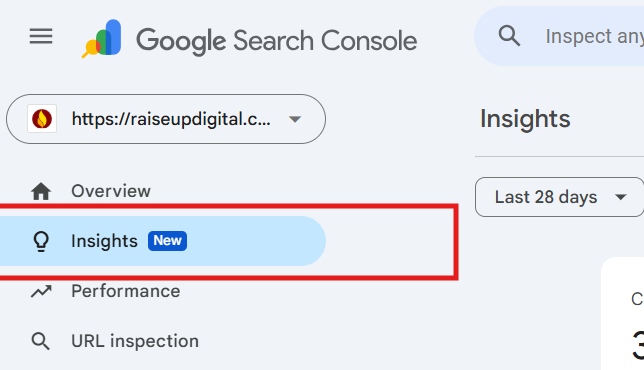
Search Console Insights helps you check your search performance without digging through several reports. It covers clicks, impressions, popular pages, pages gaining or losing clicks, search queries, and visitor countries. Google brought it into the main Search Console interface on June 30, 2025. It uses Search Console data and not Google Analytics. You’ll need GA4 to check what visitors do after they arrive.
What Is Google Search Console Insights?
It’s the “just tell me what’s happening” version of Search Console. You get your main search numbers on one screen, minus the filters and jargon. The regular reports suit SEO people like me. Insights suits the blogger, the content writer, or the business owner who has ten minutes on a Monday. In plain terms, it answers four things. Which pages get clicks from Google. What people typed before they found you. Which pages are climbing or slipping. And which countries your visitors come from.What Changed in Search Console Insights?
Quite a lot, actually. If you read a guide from 2024, including the old version of this one, parts of it are wrong now. Google first tested Insights alongside a small group of beta users on August 17, 2020. It opened up to everyone the next year. At the time, it combined Search Console data with Google Analytics data. Google later dropped the Analytics data. According to PPC Land, that change happened in December 2024. Then Insights got a new home. On June 30, 2025, Google announced on the Search Central blog that the report was moving into Search Console itself. The separate beta page was retired. Some users had to wait a little longer to see it in their accounts. On July 14, 2025, Barry Schwartz confirmed on X that the rollout was reaching more users:“Yes, Google Search Console’s new Insights report is rolling out to more.” Barry Schwartz, CEO of RustyBrick and founder of Search Engine Roundtable, July 14, 2025
What Are the Key Benefits of Search Console Insights?
The biggest benefit is time. You spot what needs attention in minutes, not an hour of clicking around.1. You See How People Find You
Insights lists the searches that bring people to your site. It also shows the countries those clicks come from. Don’t skip the country data. I’ve seen Hyderabad businesses get half their clicks from the US. That’s either wasted effort or a market they never knew they had.2. Your Best and Worst Pages Show Up Fast
Your top pages by clicks sit right there. So do the pages trending up and the ones trending down.3. The Data Is Cleaner Now
I’ll say it plainly. Losing the Analytics data was a good thing. Clients used to ask why the Search Console numbers didn’t match Analytics. Search Console counts clicks from search results, while Analytics tracks visits on the website, so the totals won’t always line up. Insights now shows only Google Search data, which makes those conversations a bit simpler.4. You Can Tell if Your Updates Worked
Clicks and impressions show up next to the previous period. Updated a post last month? You’ll see if it helped, without building a custom report.How Do You Access and Set Up Search Console Insights?
If your site is already verified in Search Console, you possess Insights. There’s nothing extra to switch on. You might remember the old standalone page, or opening it from the Google app. Forget those. Go to Google Search Console and find Insights in the main menu. Starting from scratch? This is the order I follow with new clients:- Verify the site in Search Console. I almost always choose a Domain property, since it covers every version of the site.
- Wait a few days. Fresh properties look empty at first. That’s normal, so don’t panic.
- Open Insights. Set your date range and glance at the comparison with the last period.
- Link GA4 on its own. In Google Analytics 4, go to Admin, then Product links, then Search Console links.
- Bookmark it. If it’s not one click away, you’ll stop checking it. Trust me.
How Do You Use Search Console Insights concerning SEO?
Use it as an early warning system. It shows what’s rising and what’s sliding, and you dig deeper only where it matters. My routine is boring, and it works. Coffee, Monday morning, ten minutes in Insights. That decides what my team fixes that week.1. Track New Content Performance
The old beta had a card called “Your new content.” It’s gone. These days, I just watch the trending up list after publishing something new. Still invisible after three or four weeks? Run the URL through the URL Inspection tool. Nine times out of ten, Google simply hasn’t indexed it yet.2. Find Top Queries
Check which searches lead to each of your pages. Then work those exact phrases into headings and answers on older posts. The odd queries are the fun part. Once, a client’s page about home loans got clicks for a question about stamp duty. That one query became their next article.3. Catch Pages Before They Sink
A page on the trending down list is waving a red flag at you. Act early, because a slow slide is far easier to fix than a crash.4. Check Engagement in GA4
Insights won’t tell you how long people stay anymore. For that, open the Pages and screens report in Google Analytics 4. Low engagement time usually means one thing. The page takes too long to get to the point.5. Look at Who Links to You
The old Insights showed referring websites. Now I use the Links report in Search Console for that. If a site already links to you, they like your stuff. Contact to them, or write more for their readers.What Does the Google Search Console Insights Report Show?
It shows a handful of cards, each answering one question about your Google Search traffic. Up top, you get total clicks and impressions, compared with the previous period. Below that sit your most-clicked pages, plus the pages trending up and down. Then come your top search queries and how those searches are moving over time. Finally, there’s a breakdown of the countries people click from.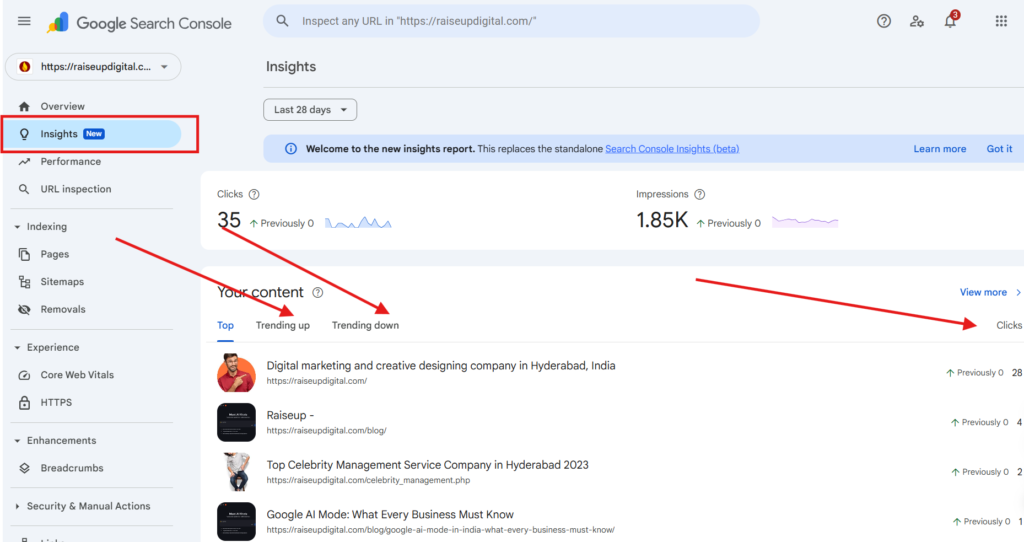
Search Console Insights vs Google Analytics: Which Should You Use?
Both, honestly. Insights shows how people find you on Google, and Analytics shows what they do once they land.| Feature | Google Search Console Insights | Google Analytics 4 |
|---|---|---|
| Focus | How your content performs on Google Search | What visitors do on your site |
| Data source | Google Search data only (since 2025) | Your site’s tracking code |
| Traffic covered | Google Search clicks | Search, social, direct, referral, and more |
| Best for | Bloggers, writers, SEO strategists | Marketing analysts, developers |
| Ease of use | Open it and read | Needs setup and some patience |
Key Takeaways
- Insights moved into the main Search Console on June 30, 2025.
- It dropped Google Analytics data, so check engagement in GA4.
- Pages trending down need attention early, not next quarter.
- Top queries are your cheapest source of new article ideas.
- Spot problems in Insights, then investigate in the Performance report.
Frequently Asked Questions
What is Google Search Console Insights?
It’s a simple report inside Search Console that shows how your content does on Google Search. You’ll see clicks, impressions, top pages, trending pages, top queries, and countries. Think of it as the quick-read version of Search Console.How is Search Console Insights different from standard Search Console reports?
I use Insights for a quick check of which pages are doing well and which have lost clicks. If something needs a closer look, I open the Performance report. That’s where I can compare dates and check individual pages, queries, and devices.Can I use Search Console Insights without Google Analytics?
Yes. You don’t need Google Analytics to use Insights. The report uses Search Console data. To see what people do once they reach your website, such as how long they stay or whether they send an inquiry, check GA4 separately.Is Google Search Console Insights still in beta?
No. Google replaced the separate beta version with a report inside Search Console in June 2025. You can access it from the main Search Console menu for any property you can view.How often should I check Search Console Insights?
Once a week works for most sites. I do it every Monday, and it rarely takes more than ten minutes. Daily checks mostly just add stress. Staring at your Search Console and not sure what to fix first? Our SEO team at Raiseup Digital in Gachibowli, Hyderabad, does this every week. Send us your site, and we’ll tell you where to start.
I bring 15+ years of experience in SEO, helping businesses across industries grow their organic visibility and improve website quality. My work spans enterprise, technical and local SEO, GEO, AEO, content strategy, and link building. I also handle site quality assessments, backlink audits, traffic drop investigations, and manual action recovery.
Alongside consulting, I train professionals and teams in SEO and AI search, turning complex concepts into practical skills they can use.